Account settings
Every tab of Settings explained - Profile, Security, Connections, Legal and Beta.
Settings (under Account in the sidebar) is about you: your name, how you sign in, your linked accounts and your legal documents. It is not the same as a community's Settings tab.
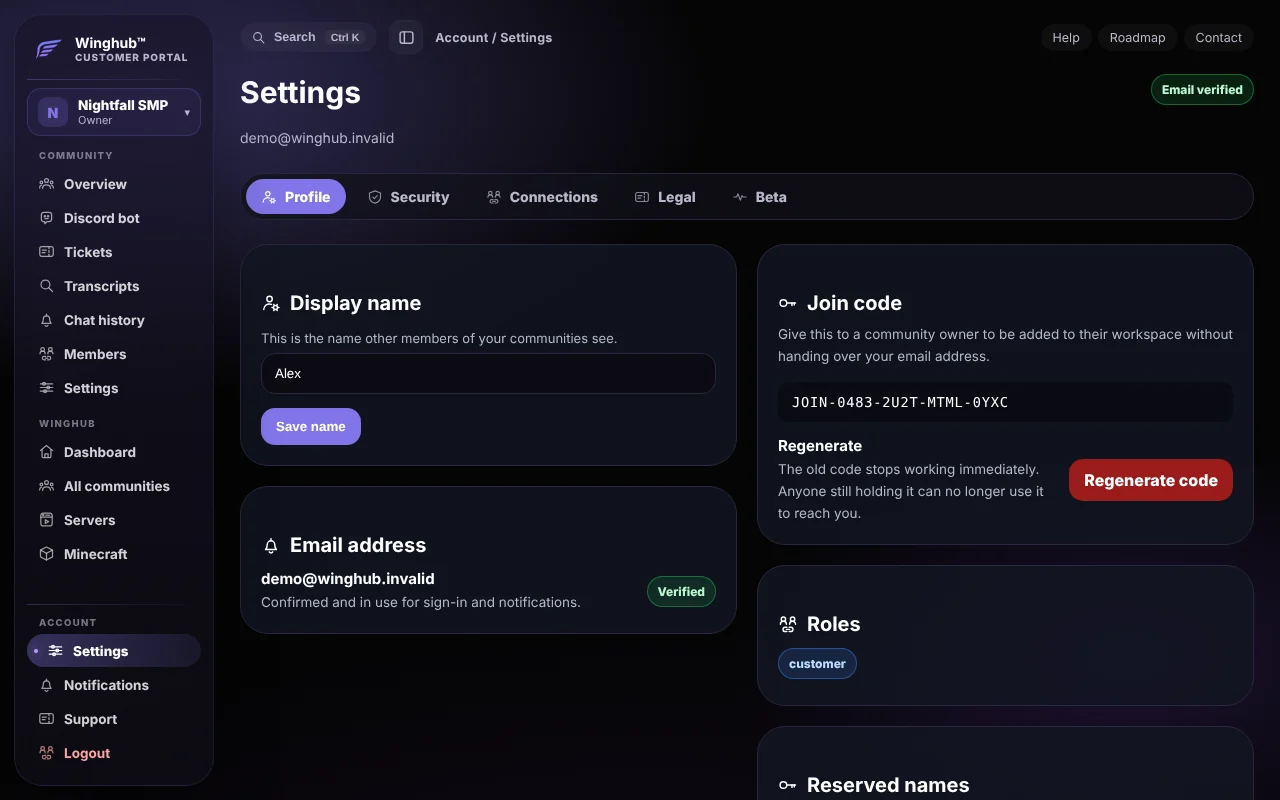
Account settings. Recorded from the Portal with sample data.
The tabs
  Settings
  [ Profile ] [ Security ] [ Connections ] [ Legal ] [ Beta ]
     who        how you get   Discord and     documents   beta
     you are    in, sessions  Minecraft       + privacy   tokens
If your email is not verified yet, every tab shows a banner with Resend verification email. Some features stay locked until you confirm it.
Profile
| Section | What it does |
|---|---|
| Display name | The name other members of your communities see. Change it and choose Save name. |
| Email address | The address you sign in with and receive mail at, with Verified or a Resend email button. |
| Join code | Your personal code. Give it to a community owner so they can add you without your email. Regenerate code makes a new one; the old one stops working immediately (you are asked to confirm first). |
| Roles | Any platform roles on your account. Most accounts have none beyond the default. |
| Reserved names | Community addresses you hold with the reserved-name add-on. You can Request a name (reviewed by a person) or Release one. Without the add-on, this section explains it and links to support. |
Security
Password
Enter your Current password and a New password (at least 10 characters), then choose Change password.
Changing your password signs you out on every other device.
Sign-in protection
| Setting | What it does | Default |
|---|---|---|
| Email code authentication | Every sign-in asks for an 8-digit code emailed to you, valid for 10 minutes. Protects you if someone learns your password. | Off |
| Login alerts | Winghub emails you each time a new sign-in completes on your account, with the IP address and browser. | On |
| Protection level | Shows Standard or Elevated. Some account types must use email codes and cannot turn them off. | - |
Use Turn on / Turn off next to each setting.
We recommend switching on Email code authentication. It costs one extra step at sign-in and stops someone who only has your password.
Active sessions
A table of the devices signed in to your account: Device, IP and Last seen.
Sign out all devices ends every session, including the one you are using. Use it when you see a device you do not recognise, then change your password.
Security contact
Found a vulnerability or a security problem? Mail [email protected].
Connections
Discord
Choose Connect Discord and approve in Discord. Linking your Discord account:
- unlocks the Member role in the official Winghub Discord server;
- lets staff see one profile for you across Discord and Minecraft.
Choose Unlink Discord to remove it.
This is separate from Connect Discord on the Discord bot page, which asks Discord which servers you manage so you can configure the bot. See Create your first community.
Minecraft
- Link your Discord account first (the Discord section above).
- On a Winghub-run Minecraft server, type
/linkin game. You get a 6-character code. - In Settings > Connections, enter the code and choose Link account (or type
/link CODEin the community's Discord: the same code works in both places). - The account appears in the list. Unlink removes it; an account marked "through Discord" is removed with
/unlinkin that Discord.
A code from a Winghub-run server lasts 30 minutes (one from the older Winghub plugin, 10 minutes). If yours is refused, the message says why: unknown or expired, Discord not linked, already linked to someone else, or the server could not be asked. You can link more than one Minecraft account. See Link Minecraft and Discord accounts.
Legal
| Section | What it shows |
|---|---|
| Documents | Each legal document (Terms, Privacy Policy, Cookie Policy and others), its version and whether you have Accepted it or Action needed. |
| Privacy requests | Your privacy requests and their status, with Open a privacy request. |
When a document is updated, an Acceptance needed box appears with a button to accept the new version. You can read every document on winghub.net under Legal.
More: Your data and your privacy.
Beta
Where you add and activate beta tokens. A token is added first and unlocks nothing until you choose Activate. The full steps are in Feature statuses and the Beta Center.
A community token is switched on for your communities instead of only your account: under the token, tick the communities and choose Lock in..., confirm, and enter the 8-digit code Winghub emails you. Every member of a locked community then sees the features it unlocks. A lock cannot be undone by you; Winghub support can release it. You need a verified email to enter or activate a token.
Troubleshooting
| Problem | What to do |
|---|---|
| "Password update failed" | Check your current password, and that the new one has at least 10 characters. |
| I lost access to my email | Open a support ticket while you are still signed in, category Account Help. |
| Discord linking was cancelled | Nothing was changed. Choose Connect Discord again. |
| The Minecraft code was not accepted | It expired or was mistyped. Run /link in game for a new one. |
Last updated: 11/27/2026, 8:42:43 PM