Minecraft moderation
Whitelist players, warn, kick, ban and timed-ban them from the Portal, and set your moderation policy.
New layout (closed beta): server pages have new places there. See Server pages in the new layout for where each tab went.
The Moderation page lets you whitelist players and issue warnings, kicks, bans and timed bans from the Portal. The Winghub plugin enforces them on your servers.
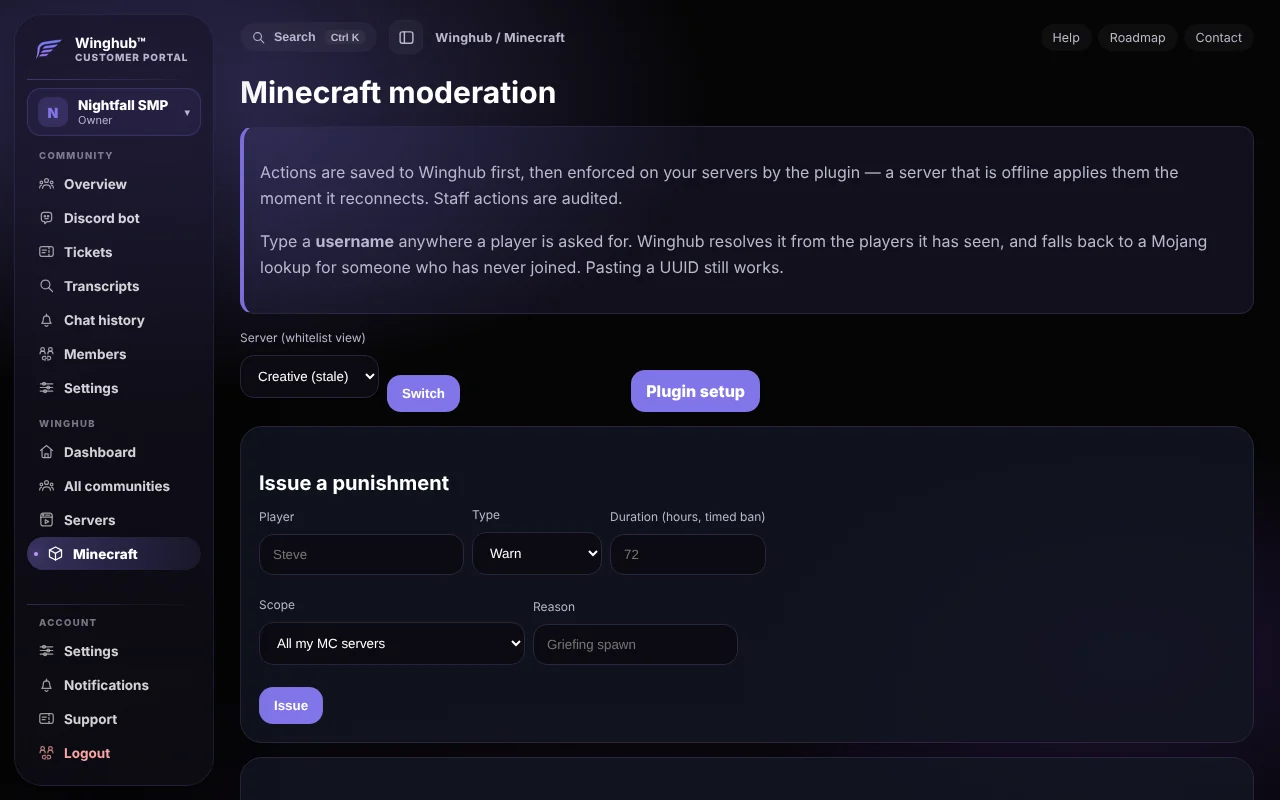
Minecraft moderation. Recorded from the Portal with sample data.
Open Minecraft, then Moderation. You need at least one server running the Winghub plugin. Without one you see "No plugin servers registered yet."
A server hosted by Winghub is moderated from its own server panel instead (Players tab, and in game with Winghub Link's staff tools).
Who can use it
Moderation belongs to the license holder. It works on the license on your own account. Community staff roles (co-owner, manager, admin, moderator) do not open Moderation for someone else's license yet. Every action is written to the audit log with who did it.
How actions travel
  You click "Issue"
        |
        v
  Saved in Winghub (the ledger)      <- always first
        |
        +--> every server in scope:  pending --> applied   (or failed)
        |
        +--> Discord (only for Global scope, when switched on): pending --> applied
A server that is offline gets the action the moment it reconnects.
Typing a player
Wherever a player is asked for, type their username. Winghub finds the right UUID:
- from players it has seen join your servers,
- then from earlier lookups,
- for a server in offline mode, by working the UUID out from the name,
- and last, from Mojang, for a player who has never joined (so you can whitelist someone in advance).
Pasting a UUID also works. Names of players who have joined are suggested as you type. If nothing matches you see "That player could not be found."
The page, section by section
Server (whitelist view)
Pick a server and click Switch. The whitelist status in the Players table is shown for that server. Whitelists are per server.
Issue a punishment
| Field | What it does |
|---|---|
| Player | Username or UUID. |
| Type | Warn, Kick, Ban or Timed ban. |
| Duration (hours, timed ban) | Only for timed bans. 1 to 8760 hours (one year). Your policy can set a lower cap. |
| Scope | Where it applies (see below). |
| Reason | Up to 500 characters. Shown to the player on the ban screen. |
| Type | What happens |
|---|---|
| Warn | Recorded in the ledger and the player's history only. Nothing happens in game. |
| Kick | The player is removed if they are online. One-time. |
| Ban | The player is removed now and cannot join until the ban is lifted. |
| Timed ban | Like a ban, but it ends by itself. Winghub checks every minute and lifts it when the time is up. |
| Scope | Applies to |
|---|---|
| All my MC servers | Every plugin server on your license. This is the default. |
| Only (server name) | One server. |
| Global (MC + Discord, when synced) | Every plugin server, plus your Discord server for linked members, if you switched that on. |
Whitelist a player
Type a player and click Add to whitelist. It adds them to the server picked at the top. If your policy requires a Discord link and the player has none, the Portal refuses and tells you why.
Players
Everyone who has joined a server running the plugin (newest first, up to 200). For each player:
- Status: banned, whitelisted or none.
- Last seen.
- Buttons: Profile, Whitelist / Un-whitelist, and Kick (a kick on all your servers, with no reason).
Punishment ledger
The last 100 punishments on your license.
| Column | Meaning |
|---|---|
| Type and scope | What was issued, and where. |
| Target | The player's name and UUID. |
| Reason | Or "No reason recorded". |
| State | MC and, when it applies, Discord, each with a state chip. Timed bans show "until" and the end time. |
| Action | Lift for an active punishment, or "closed". |
| State chip | Meaning |
|---|---|
| pending | Saved, waiting for the server (or Discord) to confirm. |
| applied | The server (or Discord) confirmed it. |
| failed | It did not work. Winghub also sends you a notification. |
| lifted | It was lifted or it expired, and the undo was sent. |
| n/a | Nothing to apply there (for example a warning, or Discord sync is off). |
Lift ends a punishment straight away and tells every server in its scope to unban. Anything still pending for it is cancelled.
Linked identities
Shows which Minecraft players are linked to a Winghub account, and that account's Discord. You can also link a player by hand. Read Link Minecraft and Discord accounts.
Moderation policy
| Setting | What it does | Default |
|---|---|---|
| Require Discord link before whitelisting | A player can only be whitelisted once their Minecraft account is linked to a Winghub account that has Discord connected. | Off |
| Remove whitelist when a linked member leaves Discord | When a linked member leaves a Discord server you connected, they are removed from all your Minecraft whitelists. You get a notification each time. | Off |
| Max timed-ban hours | The longest timed ban anyone can issue, 1 to 8760. Blank means no extra cap. | Blank |
Click Save policy.
Player profile
Click Profile on a player to see everything on one page:
- Identity: Minecraft name and UUID, the linked Discord account (or "not linked"), the servers they are whitelisted on, and first and last seen.
- Punishment history: every punishment for this player, including Discord-side ones for their linked Discord account, with Lift on active ones.
Bans in Discord too
A ban with Global scope can also reach your Discord server, for members whose accounts are linked. You switch this on per Discord server: Discord bot, Moderation, panel Minecraft, setting Apply Minecraft punishments in this Discord server. It is off by default.
| In Minecraft | In Discord |
|---|---|
| Ban | Ban |
| Timed ban | Timeout. Discord limits a timeout to 28 days, so Winghub renews it until the ban ends. |
| Kick | Kick |
| Warn | Nothing |
Without a link, or with the setting off, punishments stay in Minecraft. See Moderation (Discord).
Limits
- Timed bans: 1 hour to 1 year.
- Reason: up to 500 characters.
- The page shows the newest 200 players and 100 punishments.
Cheaters, bans and duplicate accounts: see Anticheat, bans and duplicate accounts.
Last updated: 11/27/2026, 1:58:20 AM