Tickets
Private support conversations in Discord, opened from a panel, kept as a transcript when they close.
New layout (closed beta): abilities, the Discord bot and tickets have new places there. See Abilities, the Discord bot and tickets in the new layout for where each page went.
A member presses a button, gets a private place to talk to your staff, and the whole conversation is kept when the ticket closes.
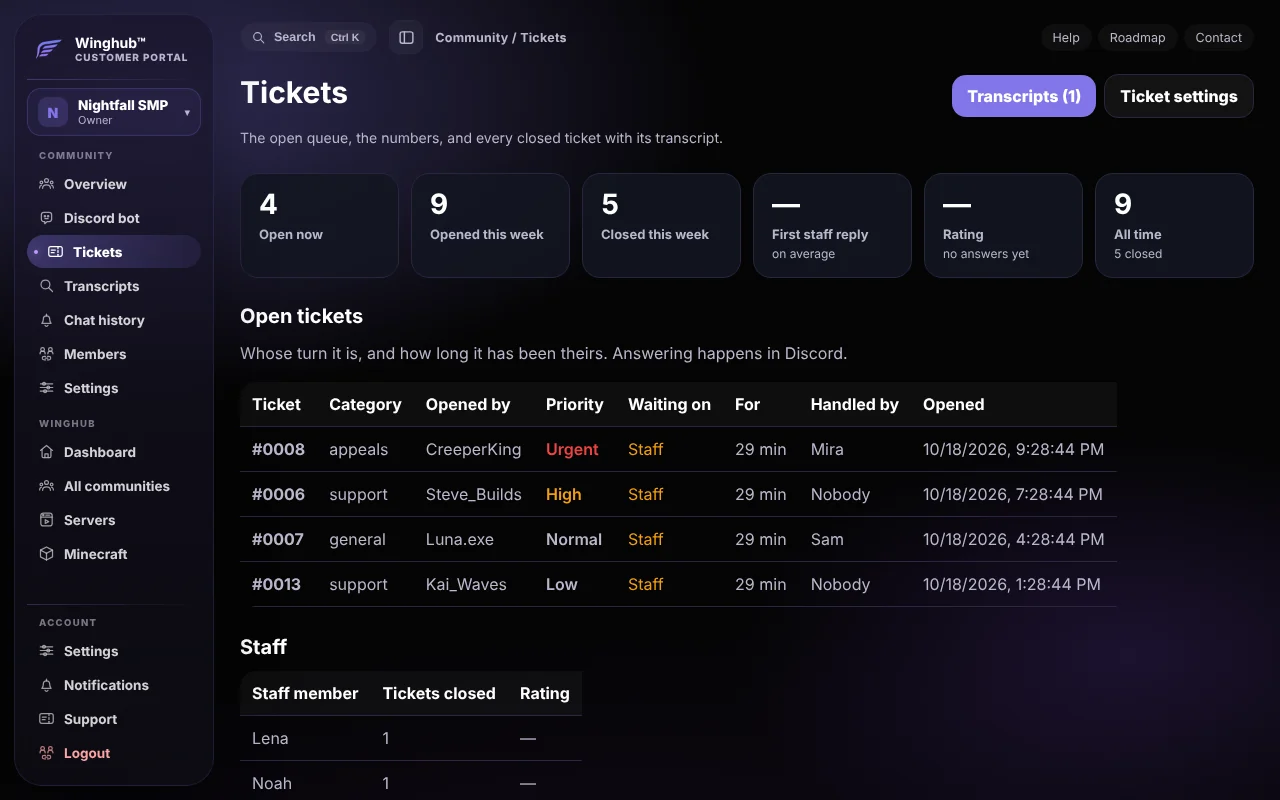
The Tickets page: open queue, numbers and staff. Recorded from the Portal with sample data.
How a ticket works
  PANEL in a channel        [ Open Ticket ]  (or one button per category)
        |
  member presses it  -->  rules checked first (blacklist, who may open,
        |                  open-ticket limit)
        |
  form? -- yes --> member answers up to 5 questions
        |
  a private channel (or private thread) opens
  with a HEADER CARD: number, category, opener, priority, answers, greeting
        |
  staff and member talk; staff use the buttons on the card
        |
  Close ticket --> transcript saved --> channel deleted or archived
The order at the end matters: the transcript is saved before the channel goes. If it cannot be saved, the channel is left in place and the bot says so in the channel. A stray channel is an annoyance; a lost support history is not something you get back.
Set it up
- In the Portal, open your community and go to Discord bot, then Tickets.
- Switch the module on.
- Open Who handles tickets and pick the Category new ticket channels are created under and the Staff roles that can see and handle tickets.
- Open The panel and the greeting and write the panel title, message and button label.
- Post the panel: use Post in a channel on the Tickets page, or type
/ticket-panelin the channel (needs Manage Channels).
Saving the settings later edits every posted copy of the panel in place. Update now does the same on request.
The bot needs Manage Channels to create, rename, archive and delete ticket channels. For private threads, see Ticket forms and categories.
The Tickets page, panel by panel
The page shows what is set. Each panel has an Edit button that opens a window with only those settings.
| Panel | What it holds |
|---|---|
| Who handles tickets | Channel category, staff roles, open-ticket limit, the Claim button, the ticket log channel |
| The panel and the greeting | Panel title, panel message, button label, greeting inside a new ticket |
| How the panel looks | Layout, pictures, colour, footer, dividers, blur, the numbers line |
| A new ticket | Channel or private thread, how it is named, its priority |
| Who cannot open tickets | Blacklisted roles and member ids, and what they are told |
| After a ticket | The "How did we do?" rating |
| When a ticket is closed | Close reason, transcript, archive or delete, reopen, the message to the member |
| On its own | Staff nudge, silence warning, automatic closes |
| The form | The questions a member answers first |
| Ticket categories | One button per kind of ticket, each with its own page |
Every setting
Who handles tickets
| Setting | What it does | Default |
|---|---|---|
| Category new ticket channels are created under | The Discord channel category for new tickets. | none |
| Staff roles that can see and handle tickets | Up to 10 roles. They see every ticket and can use the staff buttons. With none, whoever has Manage Channels can. | none |
| Open tickets one member may have at once | Stops one member opening ten tickets. 0 means no limit. | 0 |
| Show a Claim button, so one staff member takes the ticket | Adds Claim to the header card. | off |
| Ticket log channel | Every opened, claimed, resolved, closed and reopened ticket is written here. Empty: the moderation log. | none |
The panel and the greeting
| Setting | What it does | Default |
|---|---|---|
| Panel title | The bold line of the panel. | Need help? |
| Panel message | The text under it. Takes panel placeholders such as {tickets.open}. | a standard line |
| Open button label | The button text when you have no categories. | Open Ticket |
| Greeting shown inside a new ticket | The text on the header card. Takes ticket placeholders. | Thanks for opening a ticket. A staff member will be with you shortly. |
How the panel looks
| Setting | What it does | Default |
|---|---|---|
| Layout | Classic (embed, buttons under it), Card (box, buttons inside), List (a row per category, its button beside it), Dropdown (a dropdown of the categories). | Classic |
| Buttons per row | Card layout, with categories. 1 to 5. | 5 |
| Dropdown placeholder | Grey text before anything is picked. | What is it about? |
| Button text in the list layout | The button beside each category. | Open |
| Colour of the edge | Accent colour. Empty: the Winghub colour. | Winghub colour |
| Small picture, top right | An https:// link to a picture. | none |
| Large picture or banner | An https:// link to a picture. | none |
| Footer line | Small grey text at the bottom. | none |
| Divider lines between the parts | Card, List and Dropdown layouts. | on |
| Blur the panel until it is clicked | Spoiler on the box. | off |
| Show the numbers | A line such as "14 open · 231 answered", kept up to date. | off |
| Your own wording for the numbers | Empty: {tickets.open} open · {tickets.closed} answered. | empty |
A new ticket
| Setting | What it does | Default |
|---|---|---|
| A ticket lives in | A private channel, or a private thread under the channel the panel is in. | A private channel |
| How a ticket channel is named | Template with {number}, {category}, {user.name}, {user.id} and {priority}. | ticket-{number} |
| Priority of a new ticket | Low, Normal, High or Urgent. | Normal |
When a ticket is closed
| Setting | What it does | Default |
|---|---|---|
| Ask for a reason when a ticket is closed | Close opens a form asking why. The reason is stored and shown in the ticket and the log. | off |
| Save the transcript to Winghub | Keep the conversation. Read it back under Transcripts. | on |
| Also post the page as a file in the transcript channel | Posts the drawn page as an .html file next to the .txt file. | off |
| Also post the transcript in this channel | A staff channel that gets the transcript as a file. | none |
| Seconds between Close and the channel closing | 0 to 300. | 10 |
| Archive the channel instead of deleting it | Locked, read-only, renamed closed-0042. | off |
| Category archived tickets are moved to | Optional. | none |
| Staff can reopen an archived ticket | Leaves a Reopen button. | on |
| Message to the member when their ticket closes | Sent privately. Empty: nothing is sent. | empty |
Discord allows 500 channels per server. If you archive, clear the archive now and then.
On its own, blacklist and feedback
These are explained on Working a ticket and Ticket forms and categories.
What members see
- The panel, with one button or one per category.
- A short private form, if you set questions.
- A private reply: "Your ticket is ready: #ticket-0042".
- The header card at the top of their ticket, with their answers and your greeting. Only the opener and the staff roles are pinged, and only once.
- When it closes: your close message and the rating question, by private message, if you switched them on.
The Tickets page in the Portal
Tickets in the sidebar shows:
- six numbers: open now, opened this week, closed this week, first staff reply on average, rating, all time
- the open queue: whose turn it is (staff or the member), for how long, priority and who handles it
- a Staff table: tickets closed and rating per staff member
- the History of closed tickets, each with Read
Answering happens in Discord; the Portal does not reply to tickets.
Troubleshooting
| You see | Why | Fix |
|---|---|---|
| "Could not open a ticket ... missing Manage Channels" | The bot cannot create channels there. | Give the bot Manage Channels, on the server or the ticket category. |
| "The transcript could not be saved, so this channel has been left in place" | Winghub did not receive the conversation in full. | Close it again later, or delete the channel by hand. |
| "You already have 1 ticket(s) open" | The open-ticket limit. | Use the open ticket, or raise the limit. |
| "Your ticket is already being opened" | A second click while the first was still working. | Wait a moment; the ticket appears. |
Related
- Ticket forms and categories
- Staff categories, locked tickets and bringing people in (Tickets 2.0, beta)
- Working a ticket
- Ticket transcripts
- Ticket summaries
- Exporting a ticket as a .wh file
Last updated: 11/27/2026, 8:21:25 PM