Leveling and role rewards
Members earn XP for messages, voice and threads, level up on a curve you choose, get reward roles, and see a leaderboard that keeps itself up to date.
New layout (closed beta): abilities, the Discord bot and tickets have new places there. See Abilities, the Discord bot and tickets in the new layout for where each page went.
Members earn XP by taking part, level up, and can earn roles on the way.
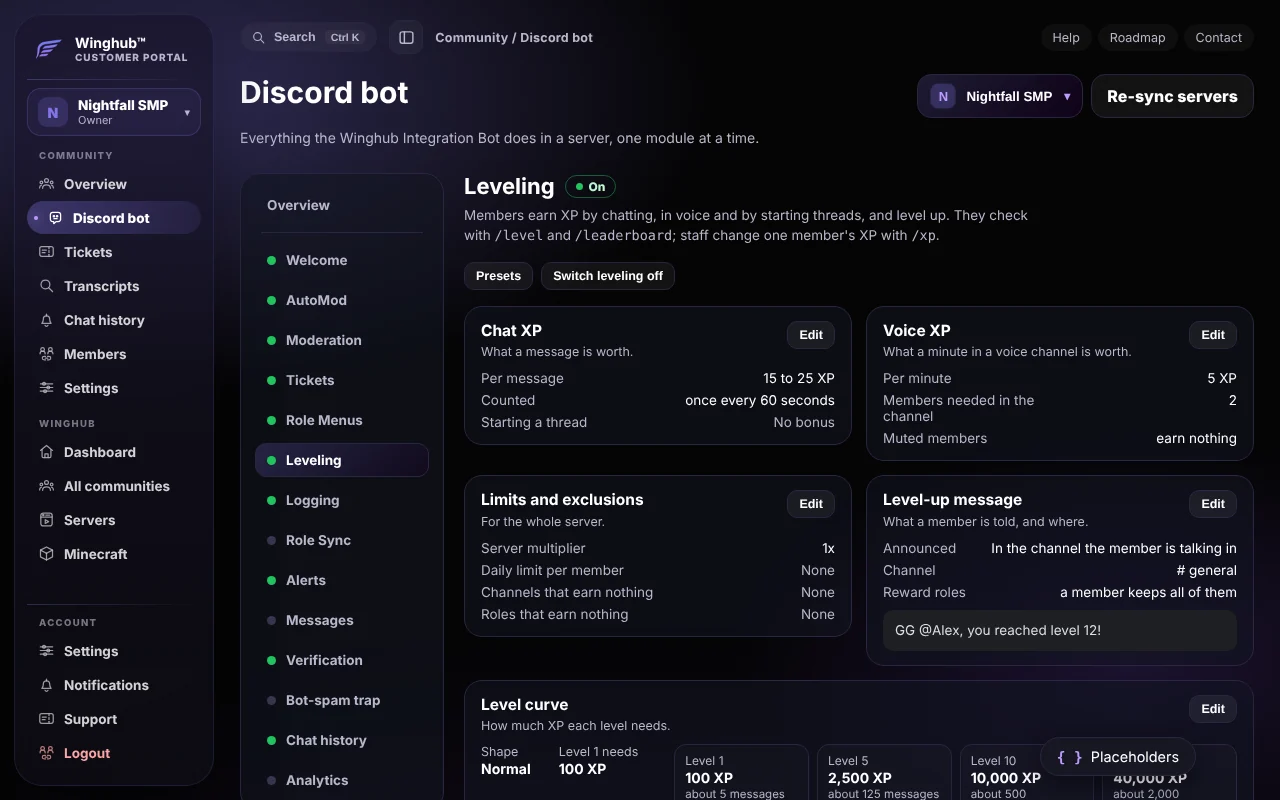
The Leveling module page. Recorded from the Portal with sample data.
Set it up
- Portal: Discord bot, then Leveling. Tick Leveling enabled.
- Choose where level-ups are announced, and write the level-up message.
- Add reward roles, and optionally post the leaderboard.
What earns XP
  a message          a random amount between "at least" and "at most",
                     once per cooldown per member (60 seconds by default)
  a minute in voice  a fixed amount, when voice XP is on
  a new thread or    an amount of your choosing, on top of the messages in it
    forum post
Voice XP counts a member who is in a voice channel with at least the number of members you set (2 by default, so nobody earns by sitting alone). Bots and deafened members are not counted and never earn, the server's AFK channel never earns, and muted members earn only if you allow it.
What everything is worth
base amount x server x channel x role x event (at most 10x)- Channel multipliers: more in a help channel, less in off-topic. A thread earns what its channel earns; a channel category's multiplier counts for the channels in it unless a channel has its own.
- Role multipliers: a bonus for boosters or supporters. With several, the highest counts.
- XP events: a multiplier for a set time, which can come back by itself. With several running, the strongest counts. See XP events.
- Channels and roles that earn nothing beat every multiplier. Threads inside such a channel earn nothing either.
- A daily limit per member, if you want one. The day runs on UTC.
The curve
  XP for level L  =  XP for level 1  x  L ^ steepness

  Gentle   later levels come quickly
  Normal   100, 400, 900, 1,600 ...   (with 100 XP for level 1)
  Steep    later levels take long
Changing the curve changes everyone's level at once. Each member is told their new level the next time they earn XP. Level 1000 is the highest.
Every setting
| Setting (Portal label) | What it does | Default |
|---|---|---|
| Leveling enabled | The module on or off. | off |
| XP per message, at least | 1 to 100. | 15 |
| XP per message, at most | 1 to 100. Never lower than "at least". | 25 |
| Seconds between messages that count | One message per member counts in this time. Stops spamming your way up. 0 to 3600. | 60 |
| XP for starting a thread or a forum post | 0 to 500. 0 gives nothing extra. | 0 |
| Time in voice channels earns XP | Voice XP on or off. | off |
| XP per minute in voice | 1 to 100. | 5 |
| Members who must be in the channel | 1 to 10. Bots and deafened members are not counted. | 2 |
| Muted members earn too | A deafened member never earns. | off |
| Multiplier for the whole server | 0.1 to 5. For a period with extra XP, use an event instead: it ends by itself. | 1 |
| Most XP one member can earn per day | 0 means no limit. | 0 |
| Channels that earn nothing | Up to 50. | none |
| Roles that earn nothing | Up to 25. | none |
| How fast levels get harder | Gentle, Normal or Steep. | Normal |
| XP needed for level 1 | 20 to 1000. | 100 |
| Where a level-up is announced | Nowhere, In the channel the member is talking in, Always in the channel chosen below, In a direct message. | Nowhere |
| Channel for level-ups and event announcements | Also where XP events are announced. | none |
| Level-up message | Up to 400 characters. Only that member is pinged. | GG {user}, you reached level {level}! |
| Members keep every reward role they have earned | Off: a member holds only the highest reward. | on |
| Title of the posted leaderboard | Leaderboard | |
| What the posted leaderboard counts | All time, The last 30 days, The last 7 days. | All time |
| Members on the posted leaderboard | 3 to 20. | 10 |
| How often the posted leaderboard is refreshed | Every minute, 5, 15, 30 minutes, or every hour. | Every 5 minutes |
Lists with their own editor on the page:
| List | Up to | Each entry |
|---|---|---|
| Role rewards | 25 | a level and a role |
| Channel multipliers | 25 | a channel and a multiplier (0.1 to 5) |
| Role multipliers | 25 | a role and a multiplier (0.1 to 5) |
| Milestones | 10 | a level and its own message |
| XP events | 20 | see XP events |
A level reached in voice has no channel to answer in: with "In the channel the member is talking in" it goes to the announcement channel if you chose one.
Messages and placeholders
The level-up message and milestone messages take {user}, {level}, {xp} and {server}, plus the shared server, time and fun words. A milestone replaces the normal message for one level (for example level 10). Reward roles are added on a line of their own.
Under every message box you see which words work there, and a preview of what a member reads.
Role rewards
- Give a role at a chosen level. Roles are given even when announcements are off.
- A role that can moderate or manage the server is never given as a reward, even if it gains that power later.
- The bot's role must be above any role it gives. Discord refuses otherwise.
- Lowering someone's XP never takes reward roles back.
Commands
| Command | Who | What it does |
|---|---|---|
/level member | everyone | Level and rank, yours or someone else's. |
/leaderboard period | everyone | The top members: All time, Last 30 days, Last 7 days. |
/xp give, /xp take | Manage Server | Add or remove an amount of XP. |
/xp set | Manage Server | Set a member's XP to an exact total. |
/xp reset | Manage Server | Remove all of a member's XP. |
/xp answers only the staff member who used it. A raised total gives any reward roles it reaches.
A leaderboard that keeps itself up to date
Post the leaderboard in a channel from the Portal (up to 3 copies). It is one message, edited in place on the refresh clock you chose, with the time it was last refreshed under the list. Update now refreshes it on request.
Why the numbers are instant
XP is held in memory and written to the database about once a minute. /level and /leaderboard add what is still waiting, so they show the current number.
Related
Last updated: 11/27/2026, 2:41:55 PM