The Winghub plugin
Download, install and configure the server-side Winghub plugin, and what it syncs with the Portal.
The Winghub plugin connects your Minecraft server to the Portal, so whitelist, kicks, bans and timed bans you set in Winghub are enforced in game.
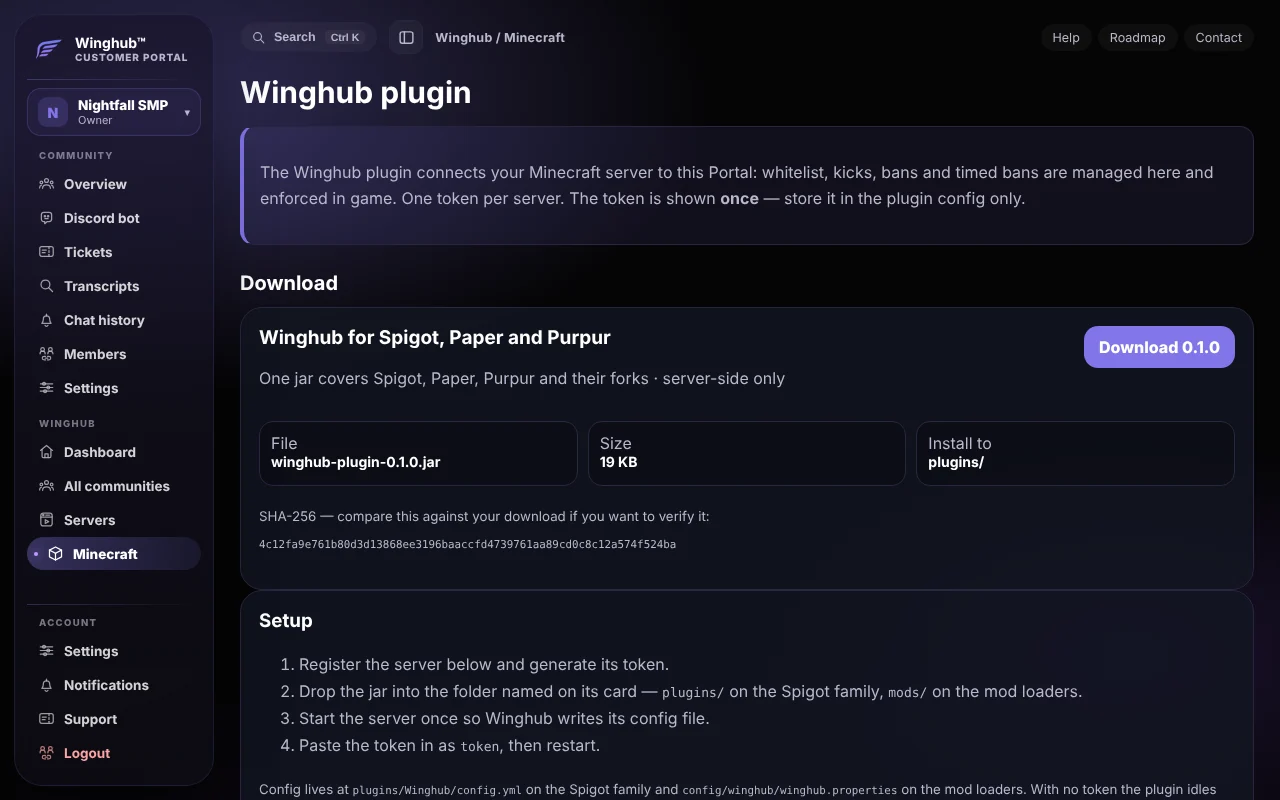
The Winghub plugin page. Recorded from the Portal with sample data.
It is server-side only. Players never install anything.
This page is for a server you run yourself. A server hosted by Winghub (Fabric or Quilt, Minecraft 26.1+) gets Winghub's own mod, Winghub Link, installed and kept up to date by Winghub; you do not download anything for it.
How it works
The plugin asks Winghub what to do. Winghub never connects into your server.
   Portal                    Winghub                    your server
     |                          |                            |
     |-- ban Steve ------------>|  saved first               |
     |                          |                            |
     |                          |<--- "anything new?" -------|  every ~10 s
     |                          |---- ban list, whitelist -->|
     |                          |     + commands (kick ...)  |
     |                          |                            |
     |                          |<--- "done" / "failed" -----|
| ledger shows "applied" | |- Winghub is the source of truth. An action is saved in Winghub first, then your server picks it up.
- Offline is fine. If your server is down, the action waits as pending and applies the moment the server is back.
- Joins never wait on the internet. The plugin keeps a local copy of the ban list and whitelist, and checks players against that copy. It also saves the copy to disk, so bans are enforced right after a restart, before the first sync.
- No token, no changes. Without a token the plugin idles quietly and changes nothing on your server.
Download
Open Minecraft, then Winghub plugin setup. Under Download you see one card per server type, with the current build:
| Server software | Folder | Config file |
|---|---|---|
| Spigot, Paper, Purpur and their forks (one jar for all) | plugins/ | plugins/Winghub/config.yml |
| Fabric (needs Fabric API on the server) | mods/ | config/winghub/winghub.properties |
Each card shows the file name, size, the folder to install to and, when known, the Minecraft version. Most cards also show a SHA-256 checksum you can compare against your download. Older builds are listed under "Previous builds".
Only builds that exist are listed. If you see "The plugin download is not available on this instance", ask support for the jar.
Install
- Register the server and generate its token (see Connect a Minecraft server).
- Put the jar in the folder named on its card.
- Start the server once so the plugin writes its config file.
- Paste the token in as
token, then restart.
The server appears as online in the Portal after the first sync.
Config settings
| Setting | What it does | Default |
|---|---|---|
api-url | Where the plugin talks to Winghub. Leave it as it is. | https://api.winghub.net |
token | The server's token from the Portal. Empty means the plugin idles. | empty |
poll-seconds | How often the plugin checks Winghub. Winghub can adjust it (5 to 300 seconds). | 10 |
enforce-whitelist | When on, only players on the Winghub whitelist can join. | true |
In config.yml it looks like enforce-whitelist: true. In winghub.properties it is enforce-whitelist=true.
The whitelist will not lock you out
Two safety rules stop a new install from locking everyone out:
- Whitelist checks start only after the plugin has loaded the list (from Winghub or from its saved copy).
- An empty whitelist counts as "not set up yet". Players are let in and a warning is written to the console. Add players in Moderation, or set
enforce-whitelisttofalseif you do not want a whitelist.
What the plugin syncs
| Direction | What |
|---|---|
| Winghub to server | The whitelist for this server |
| Winghub to server | Active bans and timed bans that cover this server |
| Winghub to server | Commands: kick, ban (removes the player now), unban, whitelist add, whitelist remove |
| Server to Winghub | Players joining and leaving (name and UUID), so they appear in Moderation |
| Server to Winghub | Plugin version, platform, Minecraft version, and whether the server runs in online mode |
| Server to Winghub | Whether each command worked or failed |
It does not sync chat, inventories, permissions or ranks.
What players see
- A banned player sees "You are banned from this server." with the reason, and either the end date (in UTC) or "This ban is permanent."
- A player not on the whitelist sees "You are not on this server's whitelist. Ask the staff team for access."
- Removing someone from the whitelist affects their next join. A player who is online stays online, as in vanilla Minecraft.
The /link command
The plugin adds one command for players: /link. It gives the player a 6-character code to connect their Minecraft account to their Winghub account. See Link Minecraft and Discord accounts.
Your servers: status and buttons
Each registered server has a card under Your servers:
| Field | Meaning |
|---|---|
| Status | never_connected (no sync yet), online (synced in the last minute), stale (no sync for over a minute), revoked (token switched off) |
| Plugin, Platform, MC version | Reported by the plugin on each sync |
| Last sync | When the server last checked in |
| Button | What it does |
|---|---|
| Generate token / Rotate token | Makes a new token. The old one stops working at once, so update the config and restart. |
| Revoke token | Switches the token off. The plugin can no longer sync until you generate a new one. |
| Remove | Deletes the server from Winghub, with its whitelist and pending commands. The punishment ledger is kept, because it belongs to your license. |
Keep the token safe
The token is like a password for this server. Winghub stores only a scrambled copy and cannot show it again. If it leaks, click Rotate token.
Troubleshooting
| You see | Do this |
|---|---|
| Console: "No Winghub plugin token set" | Paste the token into the config and restart. |
| Status stays never_connected | Check the token was copied in full and the server can reach https://api.winghub.net. |
| Status stale | The server stopped syncing. Check it is running and online. The plugin retries with growing pauses (up to 5 minutes) and keeps enforcing from its saved copy meanwhile. |
| A punishment shows MC failed | Winghub also sends you a notification. Check the plugin's console output on that server. |
Last updated: 10/25/2026, 11:15:09 AM