Ticket forms and categories
Panel layouts, up to ten ticket categories, a short form before a ticket opens, priority, threads and the blacklist.
New layout (closed beta): abilities, the Discord bot and tickets have new places there. See Abilities, the Discord bot and tickets in the new layout for where each page went.
Shape what a member picks and answers before a ticket opens, so staff know what it is about from the first message.
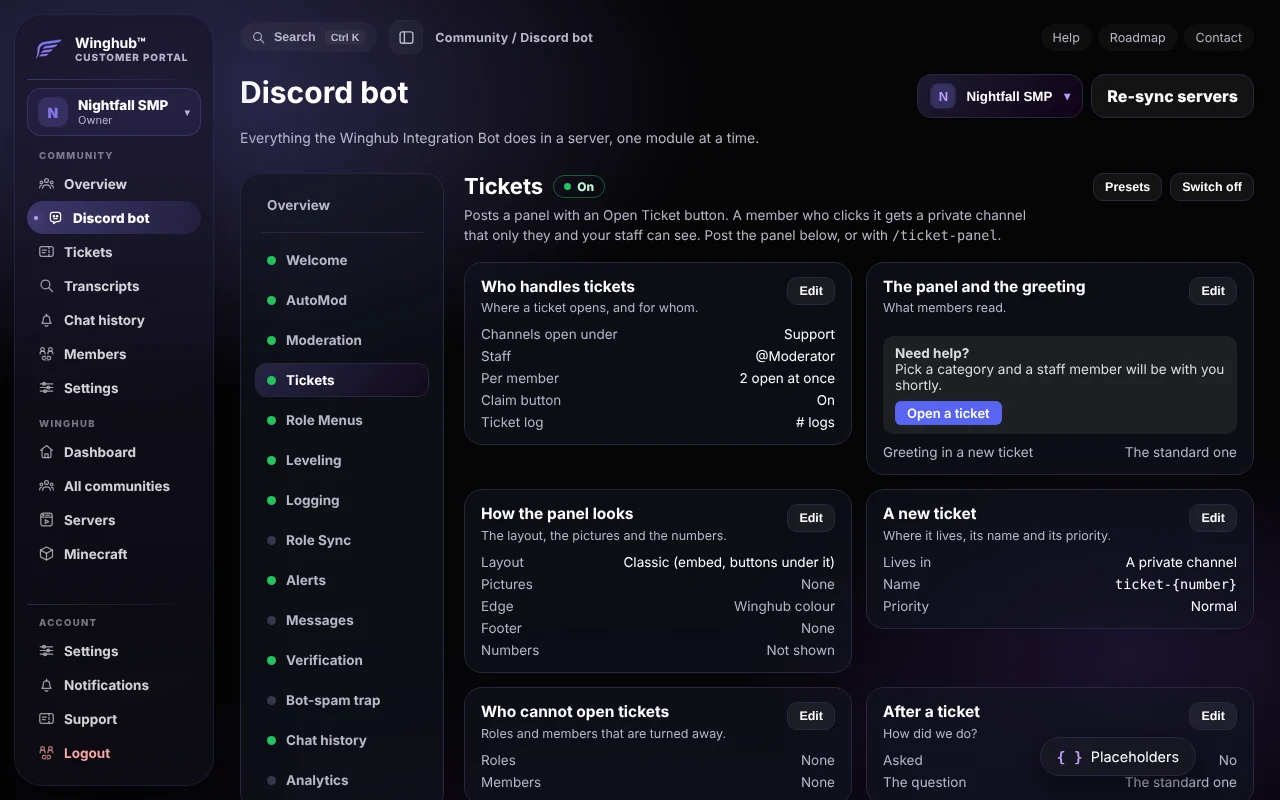
The Tickets module page. Recorded from the Portal with sample data.
Categories
A category is one kind of ticket: Billing, Reports, Appeals. Each gets its own button (or dropdown entry) on the panel. Without categories the panel shows a single Open Ticket button.
Tickets 2.0 (beta): categories members cannot open (staff evaluation, admin only), locked tickets and tickets about someone: see Staff categories, locked tickets and bringing people in.
- Up to 10 categories (two rows of five buttons in Discord).
- A category only sets what it wants to differ on. Blank means the same as the module. Change the module's greeting and every category that left its greeting blank follows.
- A button posted before a category was removed still opens a ticket, on the module's settings.
Add one
- On the Tickets page, open Ticket categories and press Add category.
- Type the Button label and press Add category. Its page opens.
- Fill in the panels you need. Use the arrows on the Tickets page to change the order.
Removing a category does not touch tickets already filed under it.
A category's page
| Panel | Setting | What it does |
|---|---|---|
| The button | Emoji (optional) | A standard emoji or one of your server's own. Use Pick, paste one, or type :name:. |
| One line under the label | Shown in the List and Dropdown layouts (100 characters). | |
| Colour of the button | Blurple, Grey, Green or Red. | |
| Who handles these tickets | Staff roles | Up to 10. With none, the module's staff roles handle them. |
| Channel category | Where its tickets open. Blank: the module's. | |
| Open tickets one member may have in this category | 0: the module's limit. | |
| Ping the staff roles when a ticket opens | On by default. | |
| Only members with one of these roles may open one | Up to 5 roles. Empty: anyone. | |
| Members with one of these roles may not | Up to 5 roles. | |
| The greeting | Greeting (optional) | Empty: the module's greeting. |
| The form | Questions | Its own questions. Empty: the module's are asked. |
| Name and priority | How its ticket channels are named | Empty: the module's template. |
| Priority of a new ticket | Same as the module, Low, Normal, High or Urgent. |
Staff of one category cannot see another category's tickets, because each ticket channel is only visible to the roles that handle it.
Panel layouts
  Classic   embed with title and text, buttons UNDER it
  Card      a box; title, text, pictures and buttons INSIDE it
  List      a box with one row per category: label, line under it, [Open]
  Dropdown  a box with one dropdown of the categories
All layouts can carry a small picture, a banner, an edge colour, a footer line and the numbers line ({tickets.open}, {tickets.closed}, {tickets.total}, {tickets.avg_reply}). A posted panel that shows numbers is refreshed about once a minute, only when a number changed. When Winghub cannot get the numbers, the panel keeps its last ones instead of showing zero.
The Preview panel draws what members will see, with example numbers.
The form
Up to 5 questions per form. Five is Discord's limit for one form.
| Box | What it does | Default |
|---|---|---|
| The question | Shown above the box. At most 45 characters (Discord's limit). | required |
| Grey hint inside the box (optional) | Placeholder text, up to 100 characters. | empty |
| Answer | One line, or A paragraph. | One line |
| The member must answer it | Required or optional. | on |
| Shortest answer / Longest answer | 0 to 1024 characters. | 0 / 1024 |
Add questions on the Tickets page under The form (Add question). A category can have its own under its own The form panel.
Rules are checked before the form appears. The blacklist, the role rules and the open-ticket limit are checked first, so nobody fills in five boxes to be told "you already have a ticket". Without questions the ticket opens on the click.
The answers go:
- onto the header card at the top of the ticket
- into placeholders:
{ticket.answers},{answer.1}to{answer.5},{question.1}to{question.5} - to the top of the transcript, and into the Portal's ticket page
Priority
Low, Normal, High, Urgent. Set a default on the module (Priority of a new ticket); a category can have its own.
  priority   dot      in front of the channel name
  low        blue     yes
  normal     white    no (shown on the header card only)
  high       orange   yes
  urgent     red      yes
Every ticket shows its priority on the header card. Every priority except Normal also puts its dot in front of the channel name, so a busy ticket list sorts itself by eye. Staff change it with the Priority button (see Working a ticket).
Channel names
The template under How a ticket channel is named can use {number} (4 digits, such as 0042), {category} (the category key), {user.name}, {user.id} and {priority}. Discord lowercases the name and turns anything it cannot use into dashes.
Channel or private thread
Under A new ticket, A ticket lives in:
| A private channel | A private thread | |
|---|---|---|
| Where | Its own channel, under your ticket category | Under the channel the panel is in |
| Who sees it | The opener and the staff roles | The opener, staff with Manage Threads there, and staff whose role is pinged on the header card |
| Channel limit | Counts toward Discord's 500 channels | No channel cap |
| Archive | Locked for the member, renamed, optionally moved | Locked and archived |
| Bot needs | Manage Channels | Create Private Threads in the panel's channel |
Who cannot open tickets
| Setting | What it does | Default |
|---|---|---|
| Roles that cannot open tickets | Up to 10 roles. | none |
| Member ids that cannot open tickets | Discord user ids, separated by commas or spaces. | none |
| What they are told | Your own refusal. | You cannot open tickets in this server. |
The blacklist is checked before anything else.
Related
Last updated: 11/27/2026, 8:21:25 PM