Public profile and the directory
Set up your public community page, choose categories for the directory, and know exactly what is and is not public.
Your public profile is the page visitors see at winghub.net/communities/<your-address>, and your card in the community directory.
Edit the public profile
You need the Admin role or higher.
- Open the community and go to the Settings tab (or use Edit profile in the header).
- Choose Edit public profile.
- Change what you need. Preview opens the public page in a new tab.
- Choose Save public profile.
Every setting explained
| Setting | What it does | Default |
|---|---|---|
| Show this community in the public directory | On: your page is public and your card is listed at winghub.net/communities. Off: the page shows "Community not found" to visitors. | On |
| Public slug | Your address. See Your community address. | Made from the name |
| Public summary | One or two lines under your name, also used in search results and link previews. Up to 500 characters. | The description you typed when creating the community |
| How to join | A "How to join" box on your page: an IP, an application process, who to contact. Up to 1500 characters. | Empty |
| Discord invite | A Discord button on your page. | Empty |
| Website | A Website button. | Empty |
| Rules | A Rules button. | Empty |
| Avatar image | Your logo, as a link to an image. Without one, the first letter of your name is shown. | Empty |
| Banner image | The wide image at the top of your page, as a link to an image. | A gradient in your accent colour |
| Accent colour | A hex colour such as #8275E8, used for your card and banner. | Winghub purple |
| Show service records on the public page | Shows your Servers & services table. Each record also has its own "show on the public page" switch. | On |
| Categories | Up to 8 tags from a fixed list, used by the directory filter. | None |
Links (Discord invite, website, rules, images) must start with http:// or https://. Anything else is not saved.
What visitors see
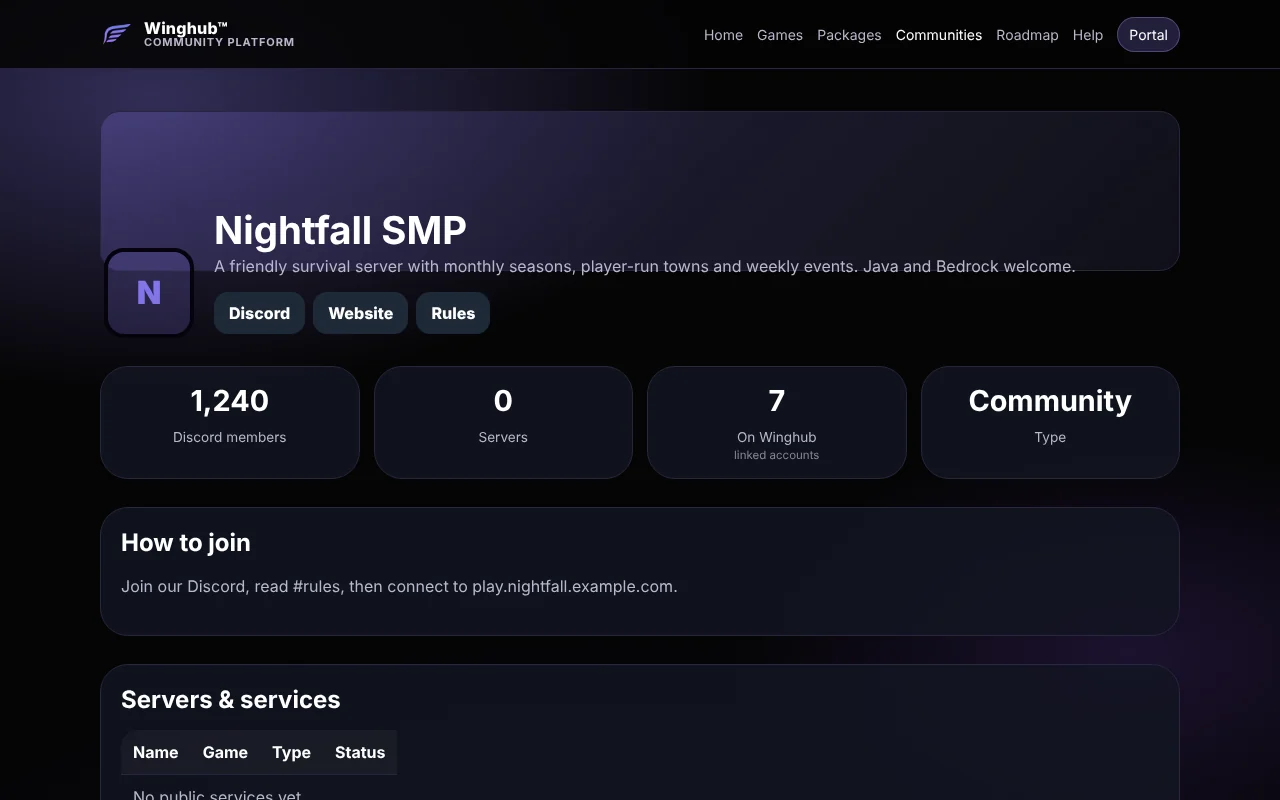
A public community page on winghub.net. Recorded from the Portal with sample data.
- Discord members is the size of your connected Discord server, with bots left out once the Integration Bot has counted them. Without a connected server (with the bot in it) this card is left out.
- On Winghub counts the active members of your community on Winghub.
What is never public
| Never shown publicly | Why |
|---|---|
| Email addresses of anyone | Members are added by join code, so emails are never needed. |
| The member list and member names | Only counts are shown. |
| The internal description | It is for your team. |
| The note on a service record | Only name, game, type, status and public link are shown. |
| Tickets, transcripts, activity log | Only for your community roles. |
The community directory
The directory at winghub.net/communities lists every community that is active and has Show this community in the public directory on. Archived and suspended communities are never listed.
- Order. Winghub can pin a community to a slot; pinned communities carry a Featured tag. Every other community fills the free places, oldest first.
- Filter. Visitors filter by category. With several categories picked, a community must have all of them. Each filter is a normal link you can share.
- Sort. Featured (the default), Newest, Most members, A-Z.
- Search filters the list as you type.
Categories
Categories come in four groups. You can pick up to 8, across groups.
| Group | Categories |
|---|---|
| Minecraft | Survival, SMP, Hardcore, PvP, PvE, Creative, Roleplay, Minigames, Skyblock, Factions, Towny, Prison, Economy, Anarchy, Vanilla, Modded, Network, Bedrock & crossplay |
| Discord | Gaming, Roleplay, Crossplay, Looking for group, Social & hangout, Esports, Content creator, Support server, Development, Art & creative, Music, Anime |
| Other games | Rust, ARK, DayZ, 7 Days to Die, FiveM / GTA RP, Hytale, Palworld, Valheim, Other game |
| Community | Casual, Competitive, Beginner friendly, Family friendly, 18+, Clan / guild, Friends group, International, English, Dutch, German, Hosting & tech |
"Roleplay" under Minecraft and "Roleplay" under Discord are two different categories. You cannot add your own; if something is missing, ask Winghub through support. Winghub staff can also correct the categories of a community.
Last updated: 10/18/2026, 11:08:19 PM